WordPress plugin · Free
Structured data that helps machines understand who you are.
Monprez Schema Identity outputs structured data that helps search engines and AI systems understand who you are, what you know, and what you've achieved. Most SEO plugins handle Articles, breadcrumbs and meta tags — but not professional identity. Monprez Schema Identity fills that gap and works alongside your SEO plugin.
Available on WordPress.org · Free & open source · No jQuery
The gap it fills
Your credentials are written for people — not for machines
Your qualifications, certifications and expertise are on your About page, your LinkedIn and the certificates on the wall — written for people, and left for machines to interpret. The major SEO plugins offer no way to publish them as structured data: hasCredential on a person, hasCertification on an organisation. Monprez Schema Identity states them explicitly, in a form built for machines.
What it does
Professional identity in structured data
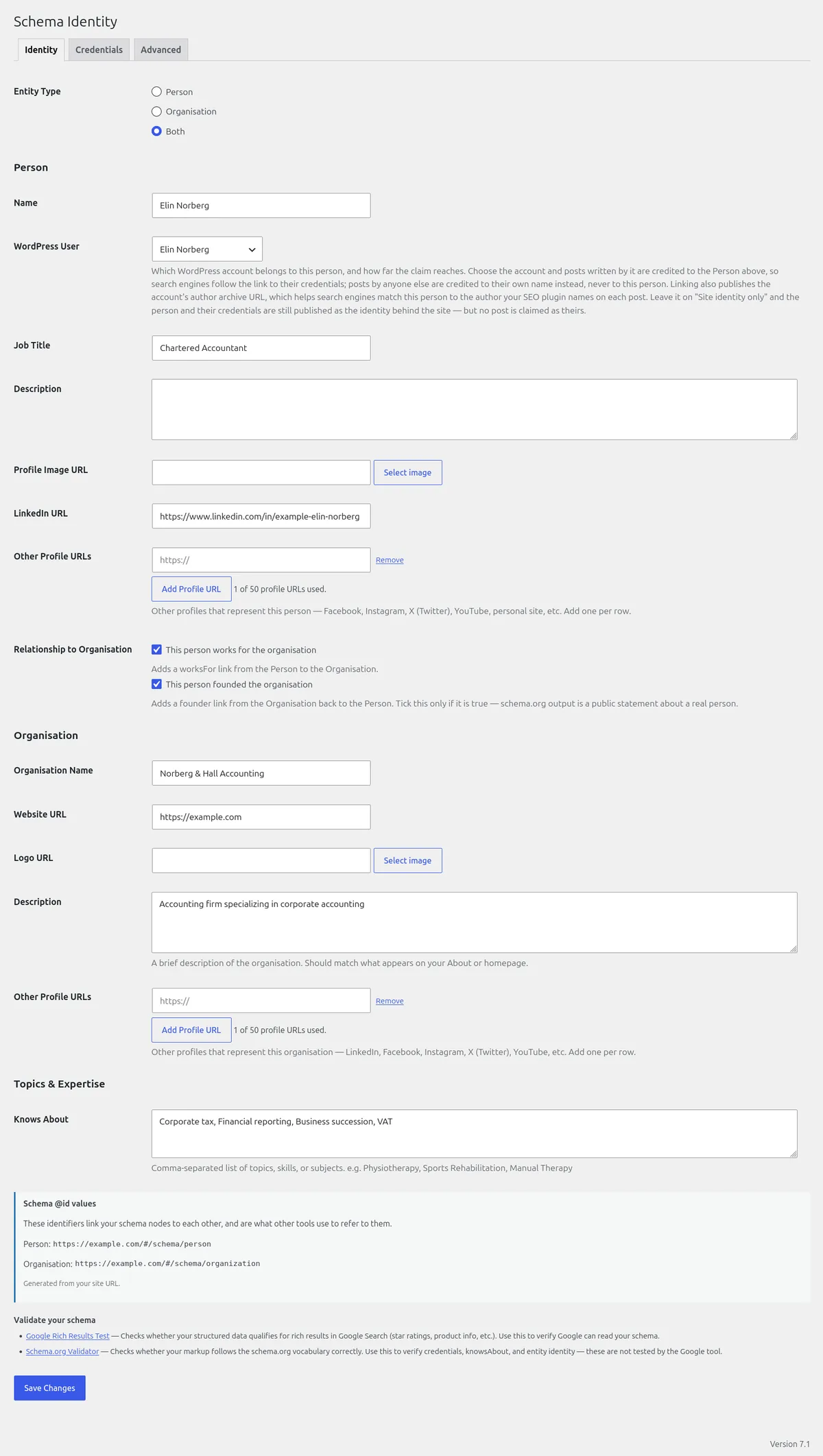
Output a Person node with name, job title, description, image, LinkedIn and additional profile URLs — and an Organisation node with name, URL, logo and profile URLs. Both can be active on the same site.
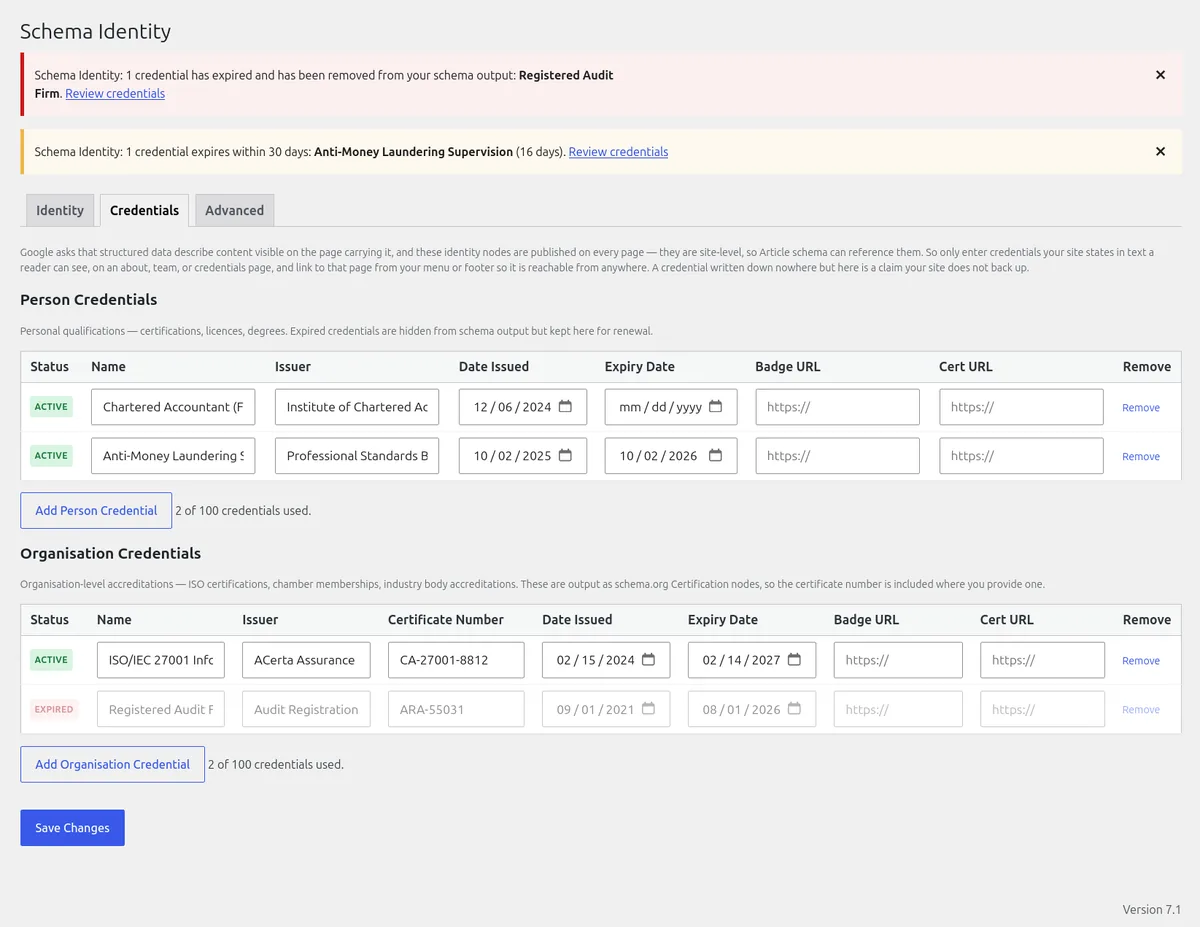
Add certifications with name, issuer, issue date, expiry date, badge image and a link to the certificate — plus a certificate number on organisation accreditations. Expired credentials are left out of the output the next time the page is generated.
List your areas of knowledge and expertise as comma-separated topics, so machines understand what you actually know.
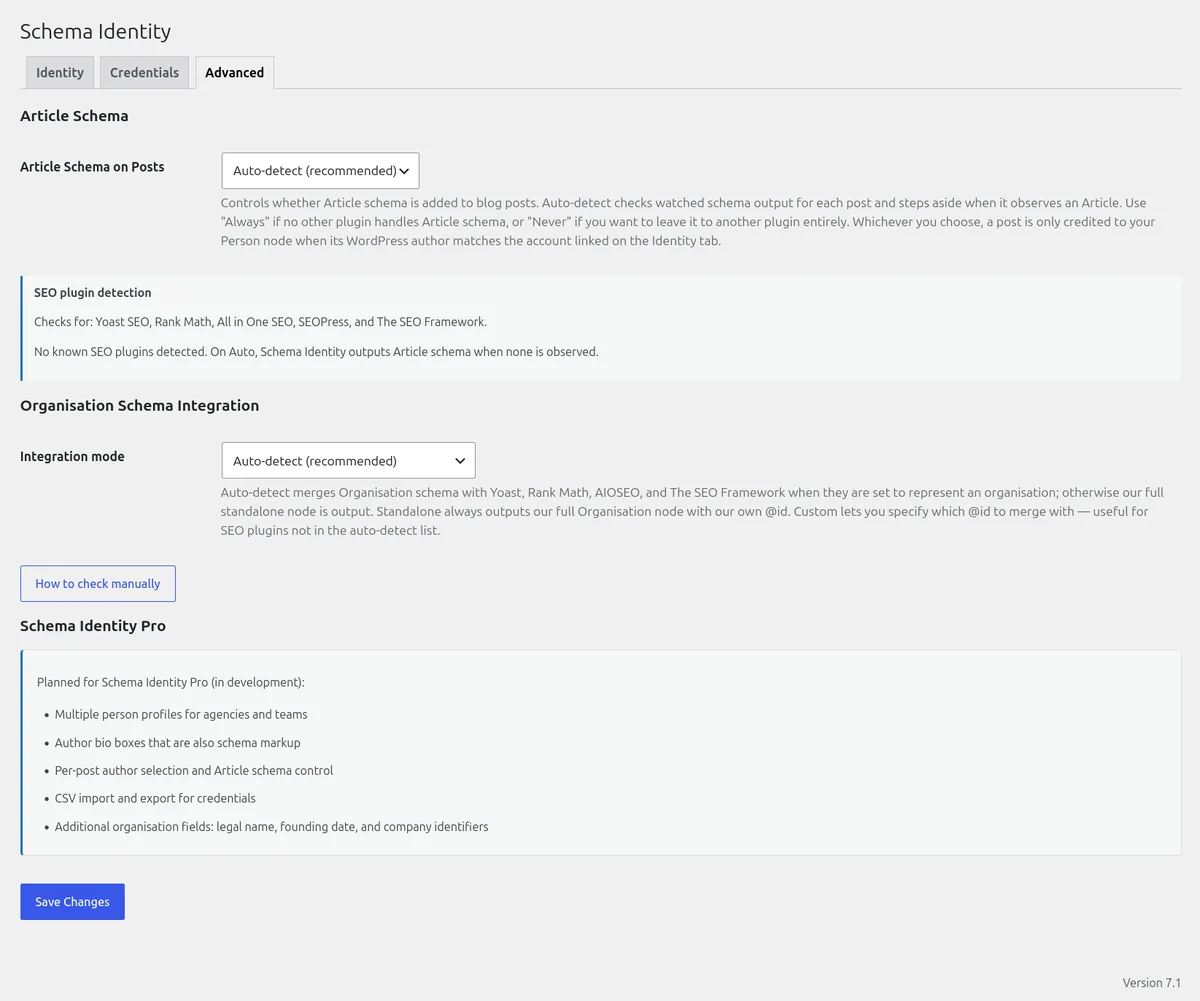
When Monprez Schema Identity outputs the Article, it connects posts by your linked WordPress account to your identity, so search engines can see who wrote it and what they're qualified in. Posts by other authors are credited to their own name. Choose globally: Auto-detect, Always or Never.
Admin notices in the dashboard when a credential has expired or is within 30 days of expiry — so your structured data stays current.
Gives you your most recent post URL and a link to the schema.org validator so you can verify your setup straight away. Plus a Settings link on the Plugins page.
Works alongside your SEO plugin
Adds what your SEO plugin cannot
Your SEO plugin handles Articles, breadcrumbs and meta tags. Monprez Schema Identity adds credentials, qualifications, expertise topics and detailed identity data. Both output structured data, and each covers different ground — no configuration needed for supported integrations.
Auto-detected
- Yoast SEO (11.0+) — Organisation schema merges; Article steps aside when Yoast publishes one
- Rank Math (Schema module) — Organisation merges; Article steps aside when Rank Math publishes one
- All in One SEO (4.0+) — Organisation merges; Article checked from 4.1.3
- The SEO Framework (5.0+) — Organisation merges; Article steps aside when TSF publishes one
- SEOPress — nodes coexist: its Organisation has no @id to merge into
How they split the work
- Merge: credentials, expertise and links are added to a supported SEO plugin's Organisation node instead of publishing a second one
- On Auto, Article schema steps aside only on pages where a supported SEO plugin is seen publishing one
- @id override in Advanced for other SEO plugins
- No ranking promises — just cleaner signals machines can read
Who it's for
Built for real professionals with real credentials
Physiotherapists, consultants, lawyers, accountants, architects, engineers, healthcare providers — anyone whose credentials matter to clients and should be visible to machines.
Businesses with ISO certifications, industry accreditations and credentialed staff. Agencies managing client sites who want lightweight schema without plugin bloat.
You understand structured data and E-E-A-T and want a focused tool that handles the identity and credential gap your main SEO plugin doesn't cover.
Free & Pro
Start free. Upgrade when you want to show the credentials off.
Free handles one identity with invisible structured data. Pro handles multiple identities and makes credentials visible to your visitors.
Free
GPLv2+ · open source
Monprez Schema Identity
One person and/or organisation identity
- Person & Organisation schema with full identity data
- Credentials repeater with auto-hide of expired
- knowsAbout expertise topics
- Article schema linking author to identity
- Detects Yoast, Rank Math, AIOSEO, SEOPress, TSF
Pro
In development
Monprez Schema Identity Pro
Multiple identities — and visible credentials
- Multiple person profiles for agencies and teams
- Author bio boxes that are also schema markup
- Per-post author selection and Article schema control
- CSV import and export for credentials
- Additional organisation fields: legal name, founding date, and company identifiers
Lightweight & focused
Does one thing — and does it well
No bloat
- No jQuery — vanilla JavaScript only
- No external requests
- No build tools, no npm, no Composer
Clean output
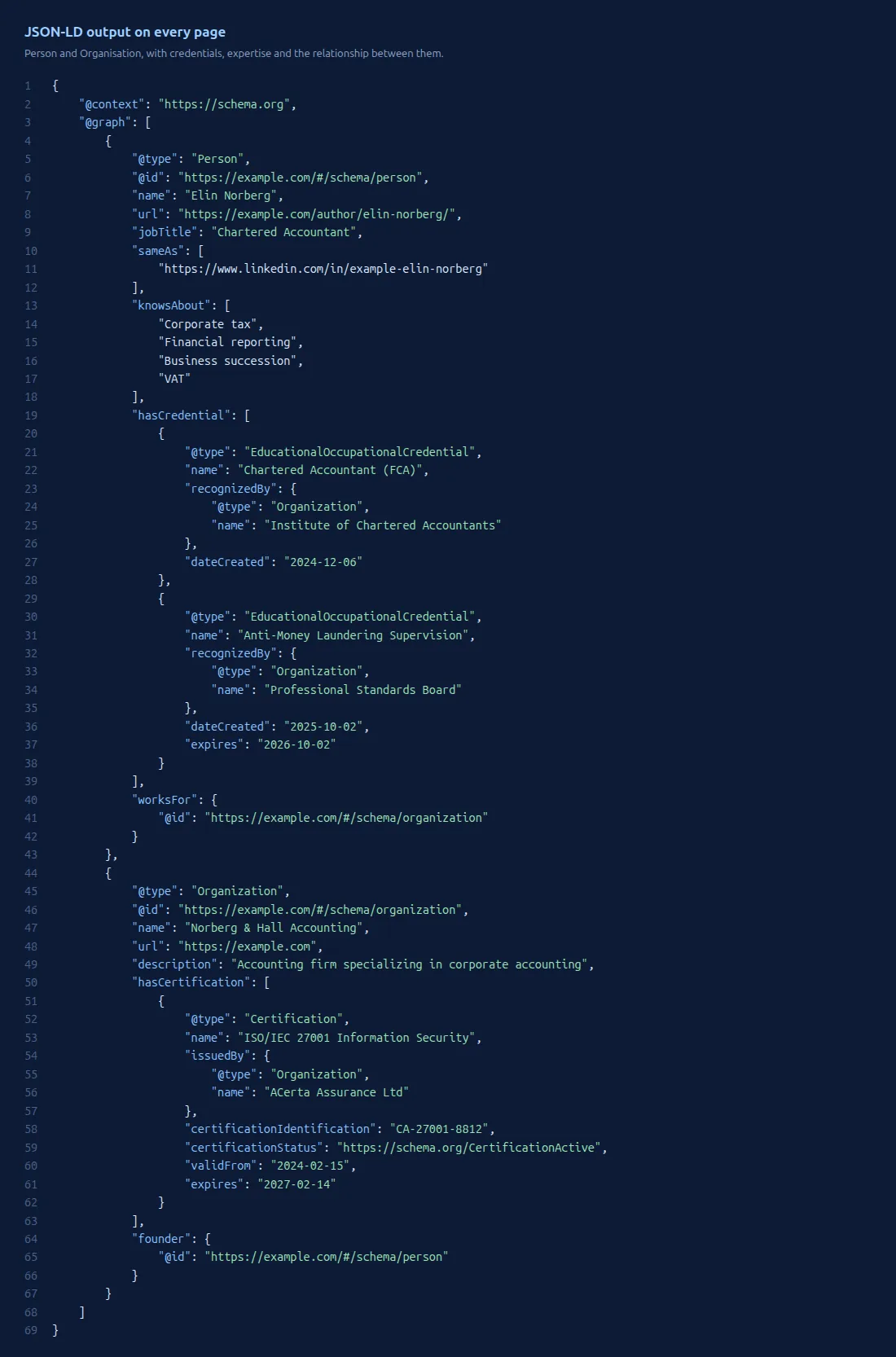
- A single <script type="application/ld+json"> block
- @graph array with correct @id references
- Validates with no errors in the schema.org validator
Open & auditable
- GPLv2-or-later — free, open licence
- Built and maintained by Monprez
- No tracking, no ads, no telemetry
FAQ
Questions about Monprez Schema Identity
Will this conflict with my SEO plugin?
It is designed to minimise conflicts. Monprez Schema Identity has been developed and tested alongside Yoast SEO, Rank Math, All in One SEO, The SEO Framework and SEOPress, and adds structured data those plugins do not produce — credentials, qualifications, expertise topics and detailed professional identity. On Auto, it checks what each page actually outputs: with supported versions it merges into your SEO plugin's Organisation node, and steps aside on posts where that plugin publishes an Article. SEOPress's Organisation node has no @id, so the two coexist. For other SEO plugins, the Advanced tab lets you point at their Organisation or turn Article schema off.
What is hasCredential schema?
hasCredential is a schema.org property that links a person to their credentials — qualifications, licences and degrees. Each one is output as an EducationalOccupationalCredential with the issuing organisation, issue date, expiry date, badge image and a link to the certificate. Organisation accreditations such as ISO certificates are output as schema.org Certification under hasCertification, with the issuer, the certificate number and its status. The major SEO plugins offer no way to enter either.
Do my credentials need to appear on the site itself?
They should. Google's structured data guidelines ask that markup describe content visible on the page that carries it. Your Person and Organisation nodes are site-level — published on every page, so Article schema can reference them — so most pages will carry credentials that are not written on that page. Linking to an about page does not change that. What you can do is keep the markup truthful: enter only credentials your site states in text a reader can see, on an about, team, or credentials page, so every claim in it can be checked on your site. There is no documented Google search feature for credentials, so this is about accuracy, not about qualifying for a rich result. The free version outputs JSON-LD only and adds nothing visible to your theme, so writing that page is up to you.
Do expired credentials still appear in the schema output?
No. A credential with a past expiry date is left out when the page is generated — if you use a full-page cache or CDN, the previous version may be served until it clears. A credential whose date cannot be read is left out entirely. An admin notice appears when a credential has expired or is within 30 days of expiry.
Does this plugin collect or share personal data?
No. Data entered in Monprez Schema Identity is stored in your WordPress database and output on your site as JSON-LD. Nothing is sent to external servers. Data you enter about yourself is published publicly as structured data — which is the intended purpose. Site owners are responsible for ensuring they have appropriate basis under applicable data protection laws before publishing data about other individuals.
What is the @id used for?
Each schema node (Person, Organisation, Article) is assigned a unique identifier — the @id. This allows search engines to link the nodes together. For example, an Article node references the Person node by its @id to indicate authorship. Monprez Schema Identity uses your-site.com/#/schema/person and your-site.com/#/schema/organization as the identifiers. The organisation identifier is different when it merges into your SEO plugin's node, or when you set your own; the settings screen shows the one in use.
Make your credentials machine-readable
Monprez Schema Identity is free, open source and takes minutes to set up. Add what your SEO plugin cannot — without the bloat.